Running one coding agent is fairly straightforward. But once you have several working on different tasks, keeping track of them takes more effort.
Which agent is still implementing? Which one needs your input? And which changes are ready for review?
If you’re working on a team, you also need to keep your own work moving. You might be building a feature locally while agents tackle a bug fix or dependency upgrade in separate worktrees.
For this, I use a terminal multiplexer called herdr, together with a Virtual Private Server (VPS).
Herdr lets me see my agent sessions side by side and switch between them easily. The VPS keeps remote sessions running when my local machine goes to sleep.
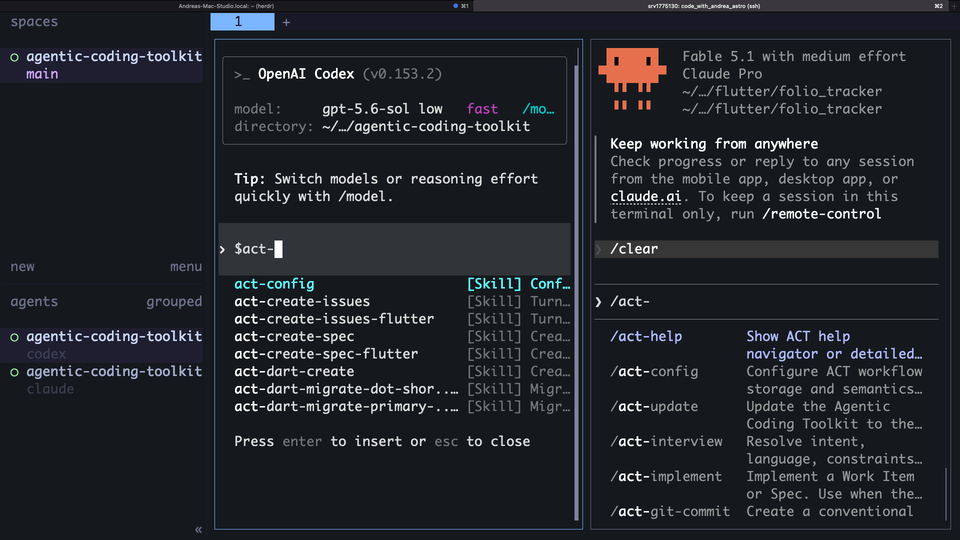
In practice, I usually run agents that need my input or UI verification locally, and use the VPS for implementation tasks that can run while I’m away.
Of course, running more agents only helps if you can keep up with their work. Clear tasks, separate worktrees, and human verification are still essential.
In this article, I’ll show you how these pieces fit together, and how I decide what to run locally versus on the VPS.
With all the talk about loop engineering and software factories, it’s easy to think you need a complex setup to run coding agents productively. For my workflow, a terminal multiplexer and a VPS are enough to run tasks in parallel and step in when needed.
How I keep track of parallel agents with Herdr
I used to run my agents in separate Cursor windows. This worked, but switching between several windows made it harder to keep track of what each agent was doing. Having all those IDE windows open also used quite a bit of memory.
With Herdr, I can see multiple agent sessions side by side and switch between them in the terminal. In practice, I usually have two terminal tabs open, each with its own set of agents:
- Local: sessions running on my own machine.
- VPS via SSH: sessions running on the server.
This gives me a convenient place to check progress and return to a conversation when I need to provide input. But having both options raises a question: where should I start each task?
Which tasks do I run locally vs. on the VPS?
The key question is: does the task require my input, or can it run while I’m away?
To explain how I decide, here’s my usual workflow: interview → spec → issue creation → implementation → review and verification. I use my Agentic Coding Toolkit to help structure this process.
Here’s what that means for where I run each task:
- Discussing requirements or writing a spec? Local or VPS both work. I need to participate in the conversation, but I don’t usually need to run the app.
- Inspecting source changes as they’re made? Local is convenient because I can open the same worktree in my IDE and browse the diff.
- Building a Flutter UI and requesting adjustments? I keep this local so I can run the app in the iOS simulator and iterate with the agent.
- Implementing a well-defined task that I’ll review later? This is a good candidate for the VPS. The agent can work through the implementation and automated checks while I’m busy or away.
For example, a scoped bug fix could run remotely while you work on a feature locally. But if the fix needs repeated visual checks, keeping it local may make the feedback loop easier.
I also tell the agent where to stop. My implementation agent skill has a flag I can use when I want it to commit, push, and open a PR. If I want to inspect the changes first, I omit the flag and the work stays uncommitted.
How I keep changes separate and bring them back for review
Unless I’m working on something trivial, I create a separate git worktree for each task that needs to be independently implemented. Each agent gets its own working directory and branch, so it can edit files without disturbing the others.
Of course, separate worktrees don’t make every task independent. If two tasks change the same interface or one depends on the other, it may be simpler to run them sequentially. In that case, I can reuse the same worktree, with each agent committing its changes before the next one starts. Breaking a spec into agent-sized tasks helps decide what can reasonably run in parallel.
I usually keep my specs and issues on GitHub. This lets me plan locally, then point an implementation agent on the VPS to the relevant issue.
When the remote changes are pushed, I can fetch the branch and check it out in a local worktree. From there, I can inspect the code in my IDE, run the app, and ask for adjustments before merging.
For a team, the PR is also a useful handoff point. It should explain what changed, which checks ran, and what still needs manual verification. A completed agent session doesn’t mean the work has been accepted.
Start with only as many parallel tasks as you can comfortably review. If several agents finish while you’re busy, their PRs still need someone’s attention.
I used this local/remote workflow during my website migration to Astro. That was work on my own website, but it provides a concrete example of how I used agents alongside human verification.
Another benefit of using my own machine or VPS is that the environment persists between tasks. When creating a worktree, I can copy over dependency caches and the
.envfiles it needs, avoiding repeated downloads and setup. On big projects, I usersyncto copy these files quickly between my local machine and VPS, since Git doesn’t track them. In an ephemeral cloud environment, I’d need to arrange for those to be restored each time.
Are there drawbacks when running agents on a VPS?
Of course! Here are the main trade-offs I’ve run into:
- Remote interactions add latency. Switching to the VPS doesn’t guarantee faster work, and a small server can become a bottleneck when several agents run builds or tests.
- SSH connections can drop. After my local machine sleeps, I may need to reconnect and reattach to the remote Herdr session. Keeping the session running doesn’t remove the annoyance of SSH disconnects.
- My remote setup is terminal-based. To browse the remote worktree in VS Code or Cursor, I need to connect through Remote SSH. Locally, I can just open it in my IDE. I also keep Flutter simulator work and hands-on UI iteration on my Mac only, since I can’t run and visually see the simulators on the VPS. Note: Flutter widget tests are headless, so they can still run on the VPS without a visible simulator.
- There’s another development environment to maintain. The VPS needs the SDKs, dependencies, and tools required by the project. Differences from the local environment can make a passing check harder to reproduce.
Permissions also deserve some thought. I’m comfortable using unrestricted agent permissions (aka yolo mode) on my own VPS, but that isn’t a default I’d carry over to a team’s repositories. Moving an agent off your laptop doesn’t remove its access to credentials, files, or remote services available on the server.
For team work, agree what the agent can access and whether it may push branches or open PRs. Keep server hardening and agent permissions in mind when setting up the environment.
What next?
After struggling to keep up with multiple Cursor windows, I’m very happy I discovered a way to manage parallel coding agents with Herdr and a VPS, all from a single terminal window, and I’d never go back to the old way.
If you’re also juggling several IDE windows, try herdr locally with a couple of scoped tasks and learn the basic keybindings. Then, if you need those tasks to keep running while you’re away, try moving them to a VPS.
That gives you a chance to see whether the setup makes your work easier to manage before adding more agents.
If your Flutter team is already using coding agents but struggling to define tasks, coordinate changes, or verify the results, I can help you improve that workflow. See my consulting page and feel free to reach out.
Thanks for reading, and happy coding!