Have you noticed that AI coding agents often perform worse near the end of a long session?
The model still has room in the context window. Nothing has technically failed. But the agent starts missing instructions, forgetting constraints, repeating work, or making oddly basic mistakes.
This is the trap with long context windows: more room does not mean more focus.
HumanLayer covered this well in Long-Context Isn’t the Answer: even if a model can accept a huge amount of context, its instruction budget is still limited.
That’s the useful distinction: the context window is how many tokens the model can receive. The instruction budget is how many constraints, rules, goals, and details it can reliably follow at once.
The practical question for us is simpler:
How do you keep an AI coding session inside the smart zone?
Think of the smart zone as the part of the session where the agent still has enough focus to follow the important instructions reliably. This usually sits within the first ~100k tokens.
Context Usage (before you even start)
Every coding harness starts by loading a bunch of context before you type your first prompt: system instructions, tool descriptions, project memory files, skills metadata, and sometimes more.
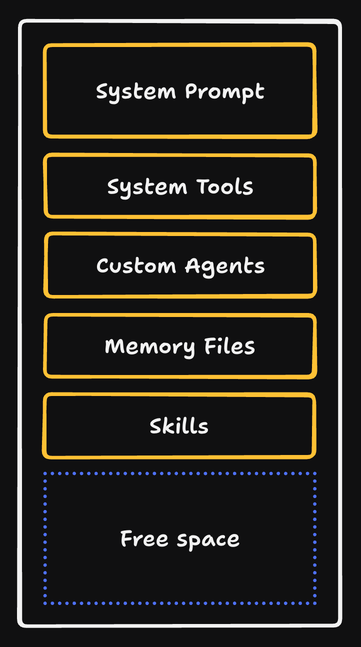
For example, running /context in a fresh Claude Code session can show something like this:
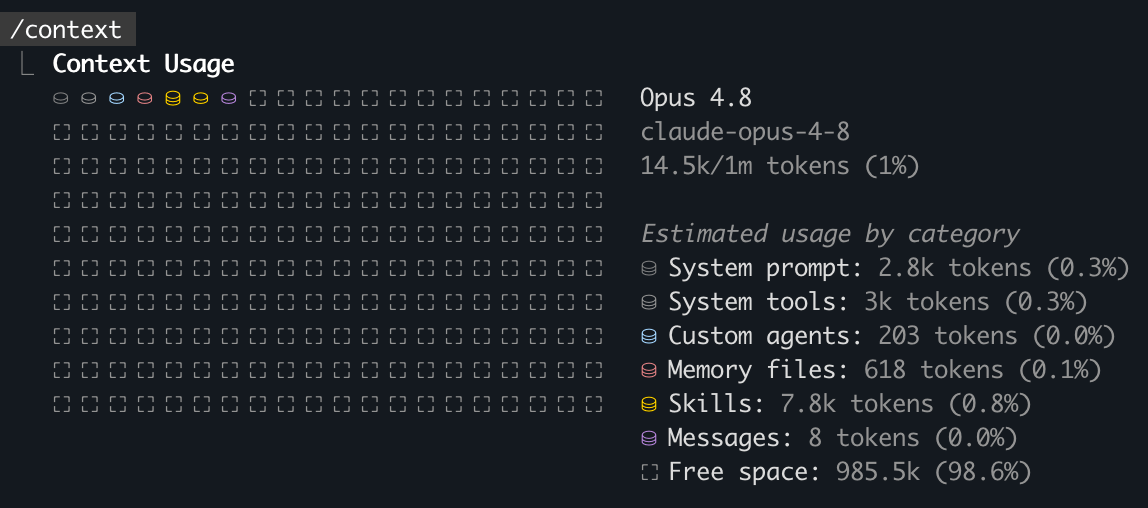
That’s 14.5k tokens used before the real work even begins.
From that point onward, the context fills with everything the agent reads and everything you ask it to do.
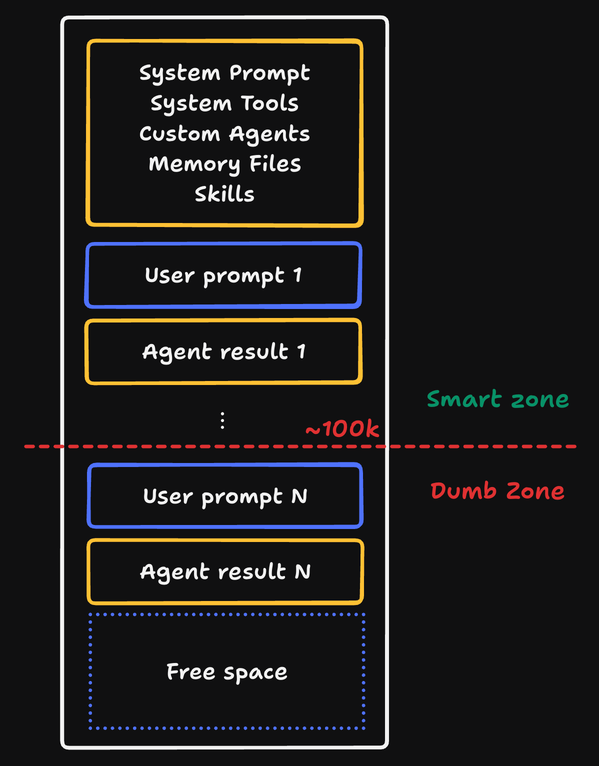
For small tasks, this is fine.
For complex tasks, the session becomes a junk drawer of requirements, failed attempts, partial decisions, and old instructions.
The agent may still have tokens left. But the important signal is now competing with too much noise.
So, what can you do?
The default options: /clear and /compact
Most coding tools give you two commands for managing context:
/clearor/new: start over with a fresh context window./compact: summarize the current session so you can continue with less context.
These tools are useful, but they’re not always the right tools:
- If you clear without saving the important decisions, the next agent has to rediscover them.
- If you compact without a clear target, you trust the agent to decide which details mattered.
- If you never clear or compact, you risk doing the hardest part of the task when the session is least focused.
What about plan mode?
Most coding harnesses have a plan mode, and for good reason: instead of asking the agent to explore, decide, and edit all at once, you ask it to understand the problem first. That usually produces better work.
But for larger tasks, plan mode can still create this shape:
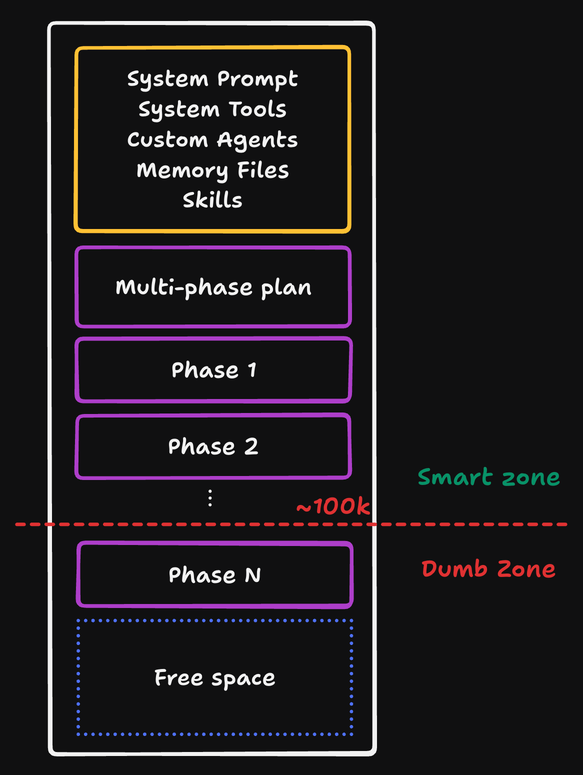
The agent spends a large amount of context exploring and planning. Then you ask it to implement everything in the same session.
That means the coding phase starts after the context window has already absorbed the planning phase, including file reads, alternatives considered, discarded ideas, and your back-and-forth while shaping the plan.
A better approach is to treat the plan as a handoff artifact.
Once the plan is good enough, start a fresh agent from it. Some tools support this directly: Claude Code and Codex both have plan-to-execution workflows. The portable version is to write the plan to a file, clear the context, and ask the next agent to implement from that file.
But even that can fail if the plan is too large.
What you really want is agent-sized work: tasks small enough to complete in one focused session, with enough persisted context that the next agent does not need to rediscover the whole problem.
The unit of work matters
This is where the software development lifecycle needs to be adapted for agentic coding workflows.
After all, humans carry judgment, memory, and context across days, but agents do not: they get one context window.
So a good AI-assisted workflow needs persisted handoff points:
- Spec: what are we building, and why?
- Interview ledger: what decisions have we captured so far?
- Work items: what are the independently executable chunks?
- Verification: how do we know each chunk is correct?
- Review: did the implementation match the original intent?
This is the pattern I’ve been building into Agentic Coding Toolkit: you clarify the intent, resolve the important product and technical decisions, capture them as a spec, split that spec into work items, and then run each implementation from a fresh context window.
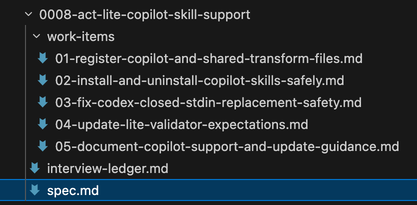
The important step is decomposition.
Instead of one giant task like “build the feature”, you create work items that can fit inside the smart zone.
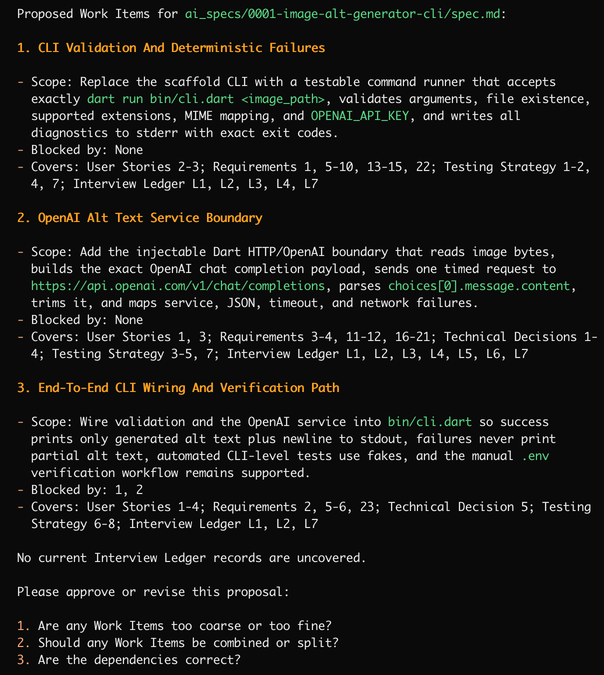
Note: the agent will propose a sensible work item breakdown, but it’s up to you to steer it towards the right granularity, based on your own judgement. While complex tasks could be decomposed into 10+ work items, simpler tasks might be folded into a single work item. The more you practice, the better you’ll get at this.
After approval, each work item can be implemented by a separate agent in a fresh session:
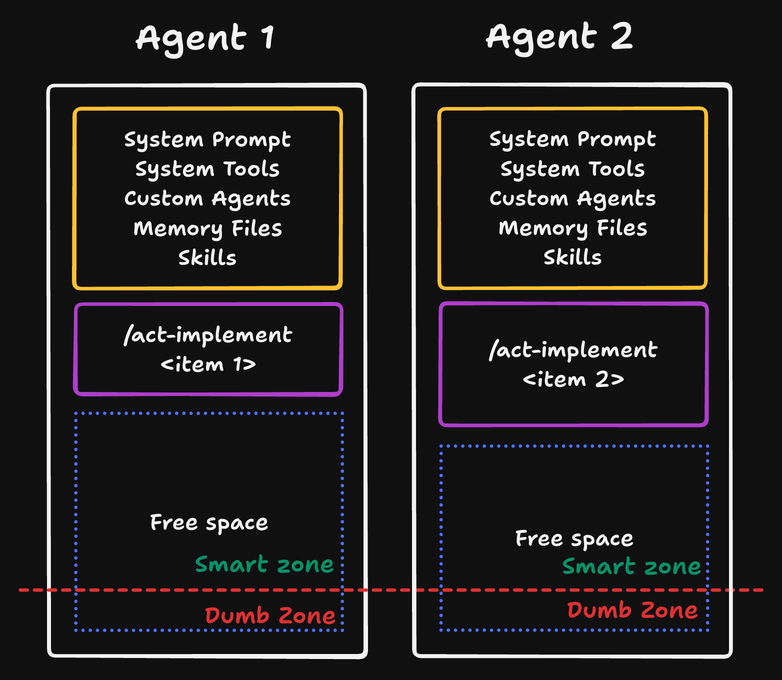
That gives you two benefits:
- Each agent starts with less noise.
- The artifacts survive the context reset.
The spec and work items can be reviewed before implementation, and the final code can be checked against them afterward.
The takeaway
Long context windows are useful in theory, but agents become less reliable once the session drifts past the smart zone.
For complex AI coding work, I now use context resets intentionally and at very specific points in the workflow, not as cleanup after the session goes bad.
If you want to feel the difference, try this workflow with the Agentic Coding Toolkit.
The lite version is free, and it gives you the core loop: clarify the intent, turn the important decisions into a spec, split it into agent-sized work items, then implement each one from a fresh context window.
Pick a feature that would normally sprawl across one long agent session and run it through this workflow instead.
You’ll quickly see why the unit of work matters.
Happy coding!