If you work across more than one repo, you have probably had to explain to your agent where things are: “the docs are in the other repo, next to this one, and the site is in a third one”.
This gets old quickly. And when a task touches two or three repos at once, the agent also needs to know what each one is for, and what should never end up in it.
For a while, I solved this by cross-referencing other repos from the AGENTS.md of each repo. I was never too happy with it, because every repo needed its own copy of the pointers.
I now use a home repo instead: one folder that contains all my project repos, with a single file at the top that says where everything is.
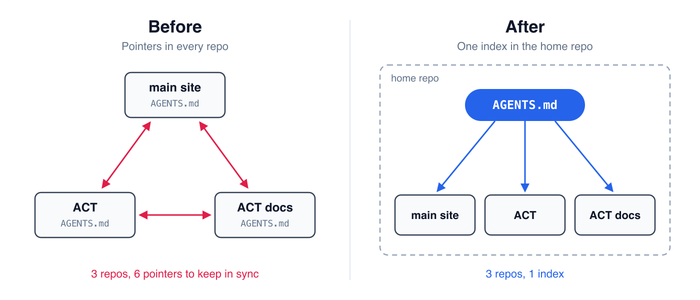
In this article, I’ll show you:
- What my home repo looks like, and how to set one up.
- What I use it for.
- Where to run your agent from: the home repo, or a project repo.
- The trade-offs to keep in mind.
I’m not the only one doing this. Matt Pocock published his own version of this pattern the same day. His home repo sits beside the other repos and he runs every session from it. Mine contains them, so I can start in a project repo and still get the index.
What a home repo looks like
All my repos live in one folder, and that folder has an AGENTS.md file at the top. Here’s a shortened version of mine:
# Repo index

Paths are relative to `~/work/codewithandrea`. Use this to resolve a repo the user names from any working directory. For remotes, run `git remote -v` in the checkout.

## Code With Andrea

- `code_with_andrea_astro` — "main site". https://codewithandrea.com/
- `code_with_andrea_courses` — https://pro.codewithandrea.com/

## ACT (Agentic Coding Toolkit)

- `agentic-coding-toolkit` — "ACT". Production skills shipped to users. Must be self-contained: never reference AI docs, private repos or third-party toolkits in it.
- `agentic-coding-toolkit-docs` — "ACT docs repo". Private docs, specs, roadmap. When the user names a file without a path, look in `ai_docs/` and `ai_specs/` here.
- `agentic-coding-toolkit-meta` — "meta ACT repo". Maintainer-only skills, scripts, verification harnesses. Create meta skills here, never in the ACT repo.

## Apps

- `flutter/pixel_picker_flutter` — Pixel Picker app on the App Store. Original iOS app: `PixelPicker-iOS`.
- `folio_tracker`* — personal investment tracker, unpublished.
- `flutter_tips_and_tricks_app`* - Flutter Tips app. https://fluttertips.dev/

## Privacy

All repos are private unless they have a live site, and even then only the published site is public. Never reference their issues, docs or paths in published content.
Each line has three things:
- The path to the repo.
- The nickname I use when I talk about it (“ACT”, “main site”).
- Any rule about what belongs there (“create meta skills here, never in the ACT repo”).
The nicknames are very useful. They let me write prompts the way I’d talk to a colleague, and the agent resolves them to the right folder.
The home folder is a git repo too
The home folder itself is a git repo, with a .gitignore that ignores everything except the index:
/*
!CLAUDE.md
!AGENTS.md
!.gitignore
So the project repos inside stay completely independent, and the home repo only tracks one small file.
I also made CLAUDE.md a symlink to AGENTS.md, so that agents that look for either file read the same index:
ln -s AGENTS.md CLAUDE.mdWhat I use it for
Here are the cases where the index has been most useful:
- Tasks that touch more than one repo, such as importing a feature from one repo into another.
- Naming things. I can say “make a new release of ACT and the ACT Dart tools” and the agent knows which two repos I mean.
- Migrations. I used it recently to rebuild my Pixel Picker app in Flutter, with the original iOS project as the reference.
- The same setup on every machine. I clone the home repo on my desktop, laptop and VPS, and the index comes with it. I also keep a small
clone-repos.shscript next to it, with one line per repo (path and remote URL), so one command clones all the project repos into the right folders.
But where should you run your agent from?
The obvious answer is the home repo: the agent starts there and reaches out to the other repos as needed.
That works, but it has a cost:
- Project instructions aren’t loaded up front. When you start in the home repo, the
AGENTS.mdinside each project repo isn’t part of the initial context, so the agent can miss that project’s build commands and rules. - The agent can wander. With every repo within reach, it sometimes explores projects that have nothing to do with the task, which wastes time and tokens.
Because my project repos live inside the home folder, I get a second option.
Claude Code loads CLAUDE.md files from the current working directory and every directory above it. So when I start it in a project repo, it reads that repo’s own instructions and the index in the parent folder (through the CLAUDE.md symlink).
In practice:
- For work in one repo, start the agent in that repo. It still knows where everything else is.
- For a sweeping change across many repos, start it in the home folder.
What if your agent doesn’t look in parent folders?
Not every agent does. For example, Codex starts at the project root (typically the git root) and walks down to your current directory, so it never sees an AGENTS.md in the folder above your repo.
So when I start a new Codex session in a project repo, I tell it explicitly:
Read ../AGENTS.mdIt’s one extra line per session, but it also gives me more control: the index is only loaded when the task needs it. With Claude Code it’s the opposite: more convenient, but the index is in context every time, whether I need it or not.
Trade-offs to keep in mind
A home repo is a small change, but it does shift a few things. Here’s what I’d watch out for.
Keep the index a map
With Claude Code, the index is loaded in every session, in every repo. So each line should be worth reading no matter which project the agent is working on.
For me, that means three things: where each repo is, what I call it, and rules about what can cross from one repo to another.
Anything that is only true inside one repo belongs in that repo. And even there, it only belongs in AGENTS.md if the agent needs it in every session. I covered how to decide in Should You Use /init to Generate CLAUDE.md or AGENTS.md?
One session can now reach every repo
That’s the point, but it also means a bad instruction or a prompt injection is no longer limited to one project.
If a checkout often has uncommitted work, or a repo shouldn’t be edited from outside, say so on its line in the index. The rules in my own index (“never reference private repos in it”) are there for the same reason.
Pull before a cross-repo change
The index says where a repo is, not how fresh the checkout is.
Before a change that spans several repos, ask the agent to check that each one is clean and up to date. A sweeping change on a week-old checkout is not fun to untangle.
It works best when the repos are related
Mine belong to the same business and mostly share a stack, so one index makes sense.
If your projects are unrelated (work and personal, say), two home repos are better than one. Each agent then only sees the projects that are relevant to it.
If your projects already live in a monorepo, you don’t need a home repo for them. The
AGENTS.mdat the root of the monorepo is already your index, and both Claude Code and Codex load it when you start in a subfolder.
How to set it up
If your repos already sit in one folder, this takes about ten minutes:
- Add an
AGENTS.mdto that folder with one line per repo: path, nickname, and what belongs there. If you use Claude Code, symlinkCLAUDE.mdto it. - Run
git initand add the.gitignoreabove, so you can sync the index across machines. - If your agent doesn’t read parent folders, tell it to read
../AGENTS.mdat the start of a session, if the task needs it. - Start your agent in any project repo and ask it where one of your other repos is, using its nickname.
If it answers with the right path, the index is loaded and you’re good to go.
Conclusion
A home repo is one folder, one index file, and a four-line .gitignore.
It won’t replace the instructions inside each project. But it means I no longer have to explain my repo layout at the start of a session, and tasks that span multiple repos have become much easier to delegate.
Thanks for reading, and happy coding!