Suppose you wanted to use AI to completely migrate a legacy codebase to a new language/framework, while preserving 100% feature parity.
How would you go about it?
And can you fully trust AI to do the job correctly?
These are questions I asked myself when I decided to use AI to migrate Code With Andrea to Astro.
This wasn’t a small rewrite. The site has more than 400 pages, several layouts, redirects, optimized images, forms, an RSS feed, a sitemap, and years of legacy code. I wanted to replace the underlying technology without breaking existing URLs, content, or behavior.
In this case study, I’ll walk you through the migration and show you how I:
- turned feature parity into a testable migration contract
- proved risky technical assumptions before scaling the work
- built a deterministic tool to migrate the content
- verified visual and semantic correctness across the site
- kept the final product and production decisions in my hands
I hope these insights will help if you ever need to migrate a codebase on time, without creating unnecessary work or blowing your token budget.
How I Approached The Problem
This migration was inspired by the Bun Rewrite in Rust project, which used 64 parallel agents to rewrite Bun in Rust for an equivalent cost of $165,000 at API pricing. While this sounds like a success story (al least for a project of that size), I later learned that the Bun rewrite is not “done” yet, and this follow-up shared some interesting insights: How is the Bun Rewrite in Rust Going?
So, I approached my problem with some skepticism, and I doubted the migration would succeed by letting a bunch of agents run unchecked.
Instead, I decided to be cautious upfront by overseeing every agent issue and PR, and preventing AI from creating a ton of unnecessary work.
Let’s dive in!
My Setup
First, some context: I completed the migration over two weeks while on holiday. With only a couple of hours a day at the keyboard, I had to be deliberate about how I used my time.
I used those hours for the work that needed my context and judgement: making decisions, iterating on specs, and reviewing PRs. All agent sessions ran inside tmux on a VPS, so I could disconnect and return to them later without leaving my laptop running.
Each agent had its own Git worktree, which let multiple sessions make progress without stepping on each other’s changes. In practice, I usually ran no more than two agents in parallel, so I could review every session’s output closely and catch mistakes early.
For the model, I used GPT 5.6 Sol on the $100 Pro subscription for most of the work, and I never hit the usage limit.
As for the workflow, I used the skills in my Agentic Coding Toolkit, plus some Astro-specific skills I wrote for the project.
Project Kick-Off
Code With Andrea was originally built with Publish, a static site generator written in Swift. It served me well for six years, but migrating to Astro meant recreating the custom behavior that had grown around that generator.
The public site has hundreds of routes. It needs correct metadata, a sitemap and RSS feed, optimized images, syntax-highlighted code blocks, newsletter forms, course pages, and several page layouts. It also has redirects, local assets, content conventions, and plenty of small details that are easy to overlook.
What did this mean in practice?
The Migration Was Not One Task
For a migration, “done” is often more ambiguous than it sounds.
At first glance, I wanted 100% feature parity. But that phrase is vague and not actionable. I had to turn it into a migration contract: a testable description of every route, redirect, metadata field, asset, interaction, and intentional exception.
For example, these were all separate requirements:
- A published article must resolve at its existing canonical URL.
- Its page title, description, and other metadata must be preserved.
- Its images and code samples must render correctly.
- A form must continue to submit to the right provider and destination.
- A discontinued feature must be deliberately excluded, not accidentally omitted.
One important scope decision was to avoid combining the migration with a redesign, CSS rewrite, or unrelated product changes. The first goal was feature parity; improvements could come later, once the new site had a stable baseline.
All of this is expert work. A model can help inspect the old codebase and implement the new one, but it cannot reliably decide which legacy behavior is a bug, which behavior users depend on, and which unused legacy features you can safely remove.
Stage 1: The Initial Interview
After six years of working on the site, much of its history and requirements lived only in my head. So I wrote an initial braindump of everything I could remember and, with some help from AI, created an initial set of project docs:
# AI Docs

* [Project summary](project-summary.md) - Migration goals, motivation, scope, and source technology notes.
* [Content folder selection](publish-content-folder-selection.md) - How the old Publish generator selects the content root with `-i`.
* [Content folder structure](publish-content-folder-structure.md) - Structure of the old site's Publish content folders and common front matter.
* [Content transformation pipeline](publish-content-transformation-pipeline.md) - How source markdown maps to generated deploy HTML and assets.
* [HTML comment modifiers](publish-html-comment-modifiers.md) - Supported custom HTML comment placeholders in old site markdown.
Then, I asked AI to interview me to flesh things out, and it produced a phased Astro migration specification, broken down into multiple GitHub issues.
At this stage, I was very much in the loop, since all important decisions were mine to make, and would heavily influence the final outcome produced by the agents.
Take away: do not ask a group of agents to rewrite the whole site. First, turn the migration into small, dependency-aware work items with clear acceptance criteria and suitable verification.
Once the initial docs and issues were created, it was time to de-risk the most important aspect of the project: the content migration.
Stage 2: Content Migration Prototype
In the old site, all content lived in a single Content folder, with subfolders for each content type. Example:
Content/
  articles/
    2026-06-12-safely-migrate-primary-constructors/
      index.md
    2026-07-14-keep-coding-agent-smart-zone/
      index.md
    ...
  videos/
    2026-05-18-should-you-use-init/
      index.md
    ...
  tips/
    2025-09-23-relative-absolute-imports-dart/
      index.md
    ...
The old site generator was using a custom build pipeline to process all .md files, remove the YYYY-MM-DD- prefix, and generate the final HTML files for publishing:
/articles/safely-migrate-primary-constructors/
/articles/keep-coding-agent-smart-zone/
/videos/should-you-use-init/
/tips/relative-absolute-imports-dart/
But could I accomplish the same thing with Astro content collections, without changing the input folder structure, while preserving canonical URLs?
I only got a definitive answer by building a small, throwaway prototype.
The result was encouraging: the prototype generated all the desired routes. It also uncovered a global image issue, which gave me an asset problem to solve before it affected hundreds of pages.
Take away: create a prototype to test a risky assumption on a small, disposable slice first. This is much cheaper than discovering that your chosen architecture cannot preserve an important behavior after the bulk migration is underway.
Stage 3: Building a Migration Tool
Next, I needed a way to turn the old content into MDX files that Astro could render.
I made this an explicit, one-way migration step:
Old content
  -> deterministic migration tool
  -> reviewed MDX and assets committed to the new site
  -> normal Astro build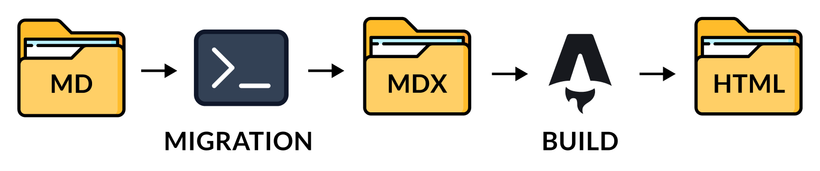
The migration tool is not part of the normal build or deployment. When it runs, it produces a complete diff that can be reviewed and committed. The committed output then becomes the input source content for the normal Astro build.
This ensures that the migration is repeatable and deliberate, while the production build remains self-contained.
Transforming Content
The tool normalized frontmatter too, but the old site did not contain plain Markdown alone. It used HTML comments as author-friendly placeholders for custom content.
For example, an embedded video in an article could be included like this:
<!-- YOUTUBE|dQw4w9WgXcQ -->The migration tool translated known placeholders into explicit MDX components. Roughly speaking, the source above became this:
<YouTubeVideo id="dQw4w9WgXcQ" />The generated MDX also imports the component it uses. This makes the behavior visible in the new source tree instead of hiding it inside a custom Markdown parser.
This was not just a mechanical syntax conversion. I had to inventory the old placeholders and classify each one:
- active placeholders became supported components
- discontinued placeholders were deliberately removed and recorded
- unsupported placeholders stopped the migration with an error
- ordinary
<!-- html comments -->were replaced by{/* MDX/JSX comments */}
If an agent sees an unfamiliar piece of input and guesses, it can produce output that looks reasonable while dropping behavior. So I designed the migration tool to fail loudly on unknown placeholders.
Take away: build a deterministic migration tool with its own test harness, rather than relying on an imprecise one-off LLM pass. AI can help create the tool, but the conversion itself should be repeatable and checked. As a side note, I also used the same approach for this Dart migration CLI.
Stage 4: Rebuilding the Site
By this point, the agents could transform the content and generate the right routes. But I still did not have a website.
The old site was built from many reusable pieces: the document head, header, footer, content cards, signup forms, video embeds, navigation, course panels, and several page layouts. I mapped these pieces before asking agents to rebuild them in Astro, then reviewed the resulting ports as they were completed.
Not everything in the legacy codebase deserved a port. Some old sponsorship, affiliate, coupon, payment A/B testing, and obsolete signup behavior was no longer active. I documented these decisions explicitly rather than letting agents copy old code just because it still existed in the repository.
For client-side behavior, I kept things static-first and local to the component that owned them. The header owned its mobile menu, the theme control handled its own preference, and course accordions owned their own interaction. This avoided a large global JavaScript bundle just to recreate a handful of small behaviors.
Take away: migrating content and routes is only part of a site migration. You also need to map the old site’s composition and behavior, and decide explicitly which legacy features are still worth carrying forward.
Stage 5: Visual Verification
One goal of the migration was to change the underlying tech stack while preserving the existing visual design. The site has more than 400 pages, four page-layout families, and many component types that all needed visual verification.
Fortunately, the legacy site used a single plain CSS file, which the Astro pages could reuse. But CSS selectors depend on the DOM hierarchy, so a missing wrapper, changed element type, or omitted class or ID could make cards lose their styling, icons disappear, or spacing change across an entire layout.
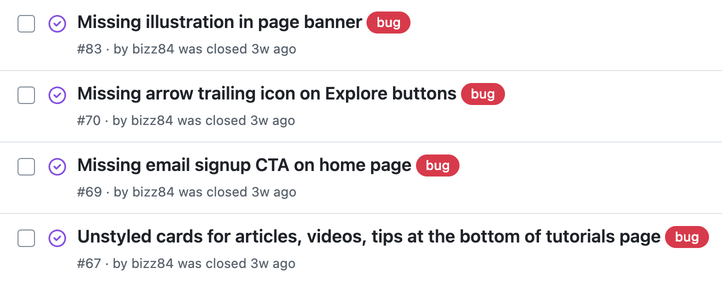
Initially, I asked AI to capture visual fixtures for every production route, at desktop and mobile sizes, in both light and dark mode. This produced useful evidence, but hundreds of routes multiplied by viewports and themes made the full-page screenshot suite painfully slow to run.
So I split verification into two tiers. Normal agent runs and pull requests only ran the build and focused tests for the behavior being changed, without the slow full-page screenshot suite. At designated release-candidate and pre-production gates, the complete migration suite combined exhaustive production-parity checks with screenshot comparisons for a curated set of representative routes.
Take away: build a test harness, but be mindful of its runtime. Split it into test groups that can be ran individually, and optimize for better return on the time it takes to run. Always keep a deployed site that a human can inspect visually.
When Screenshots Are Not Enough
A screenshot can tell you whether a page looks right. It can catch missing images, broken CSS, and responsive problems. But it cannot tell you whether every canonical URL and redirect is preserved, an RSS feed is complete, or a form submits to the right destination.
One content-migration bug made this extremely clear. To keep MDX safe, the transformation escaped braces inside inline code spans, where HTML entities are not decoded.
As a result, code such as setState(() {}) rendered with literal { and } text on multiple published pages. The site built successfully and most pages still looked fine, but the code was wrong.
A screenshot might have caught this on one selected page, but it could not prove that the same transformation had not corrupted code elsewhere. Rather than patching the affected pages, my agents changed the transformation rule and added regression coverage for the boundary between ordinary Markdown and inline code.
Together, the migration checks covered:
- route and redirect checks
- metadata and feed checks
- content-transformation checks
- integration-boundary checks for forms and external services
- a curated set of visual fixtures
Take away: screenshot tests show that selected pages look right, but they cannot prove that the whole site behaves correctly. Pair curated visual checks with direct tests for every important migration contract. And when a bug slips through, add a regression test to give you confidence and keep future agent runs in check.
The Final Production Decision Is Yours
Even a complete test harness cannot make product decisions for you. During the migration, I found a course-page link whose label did not match its destination. An agent preserving the old site would have kept that bug. Instead, I had to decide whether the existing behavior was part of the contract or something that should be corrected.
The same applies to the production release. Agents can prepare a release candidate and run the checks, but they should not silently decide that it is safe to cut over. I froze the final release candidate, reviewed the verification evidence, and kept the old site available as a rollback target before moving the production domain.
Take away: use agents to gather evidence and prepare a release, but keep the final product and production decisions with the person who understands the consequences.
Why You Still Need To Be An Expert
These days, frontier models are pretty good at implementation work. But without expert guidance, they can still make sensible-looking decisions that move a project in the wrong direction.
A few examples from this case study:
-
Legacy code: A literal migration would have carried inactive features into the new codebase, so I had to decide which legacy features still mattered, which ones should remain available behind configuration, and which ones should be removed entirely.
-
Test harness overhead: Capturing screenshots for every production route, across multiple viewports and themes, created extremely long feedback loops, so I split verification into fast, focused checks for faster feedback.
-
Production builds: One agent made normal Astro builds depend on migration inputs. I changed this so migration was an explicit, reviewed step, and ensured production builds were self-contained and ran entirely from the new site’s committed inputs.
Ultimately, it took around 100 issues and 80 closed PRs, many of which needed my input and review, before I was confident that the migration was correct and complete. I also deliberately used a workflow that created agent-sized work items, thus improving their accuracy and reducing token usage.
TL;DR: Agents can inspect code, propose solutions, and get a lot of stuff done. But they cannot know which old behavior is intentional, which is obsolete, or which trade-off is acceptable for your users and business.
AI makes implementation cheaper, but you still need to be the expert. For this migration effort, this sequence proved effective:
- Define the outcome and the constraints that matter.
- Prove the riskiest assumptions with a small slice of work.
- Turn repeated transformations into explicit, reviewable tools.
- Verify behavior, not just plausible-looking output.
- Improve the system once you have a safe baseline.
- Keep high-stakes product and production decisions human-owned.
This approach was successful and the migrated site is already live (you’re reading it right now 😉).
The workflow I used for this migration is what I’ve been building into the Agentic Coding Toolkit. It won’t replace your judgement, but it helps you capture it in specs, agent-sized work items, and verification checks, so agents can act on it consistently. 👇