The recent Dart 3.12 release added experimental support for primary constructors, a new language feature that can remove a lot of small, repetitive constructor boilerplate from our codebases.
As an example, this code:
class PrimaryButton extends StatelessWidget {
  const PrimaryButton({
    super.key,
    required this.label,
    required this.onPressed,
  });

  final String label;
  final VoidCallback? onPressed;

  @override
  Widget build(BuildContext context) {
    return ElevatedButton(onPressed: onPressed, child: Text(label));
  }
}
Can be migrated to this:
class const PrimaryButton({
  super.key,
  required final String label,
  required final VoidCallback? onPressed,
}) extends StatelessWidget {

  @override
  Widget build(BuildContext context) {
    return ElevatedButton(onPressed: onPressed, child: Text(label));
  }
}
Less code to read. Less code to write. That’s a win in my book!
In my previous article about Dart primary constructors, I’ve already covered all the syntax details, and understanding the syntax is a good first step.
But how can you migrate your codebase safely?
Since there’s no dart fix available, you have these three options:
- Migrate by hand (tedious and error-prone)
- Write a coding agent skill (error-prone, token-intensive, and doesn’t scale to large codebases)
- Write a deterministic Dart migration CLI (fast, safe, and scales to large codebases)
This seemed like a good research project, and I figured it would be a fun task for the weekend.
Little did I know that I would spend an entire week on it, and what follows is an engineering deep dive about what I learned. Let’s dive in!
Writing an Agent Skill
When I first approached this problem, my first idea was to write a skill and let coding agents do the heavy lifting.
But as I got deeper into it, I noticed that:
- different agents would produce wildly different results
- different runs on the same agent would also produce different results
To compensate, I started adding edge cases and skip rules, and after many attempts, I ended up with this massive 700-line skill:
I did iterate a lot on this skill. But, as is often the case with LLMs, each time I would change one thing somewhere, something else would break.
On one of my projects (~17K loc), I was only able to get good-enough results with GPT 5.5 and Opus 4.8, while less capable models like Sonnet only managed a partial migration.
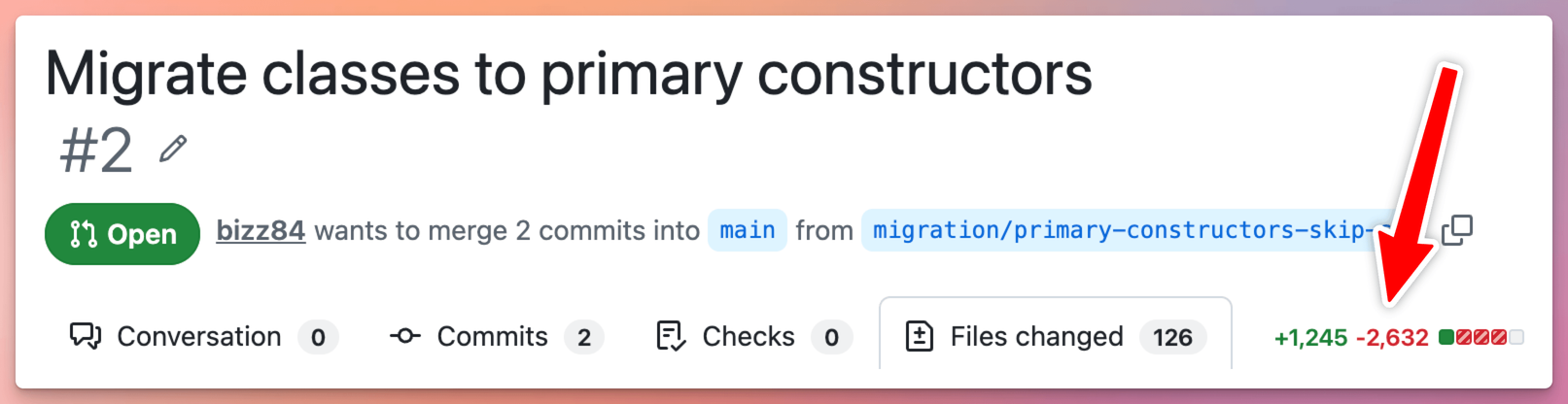
Moreover, each migration was taking >200k tokens and 20+ minutes on the frontier models. Not good enough.
So I looked closer at my agent sessions and found something I didn’t expect.
GPT Was Solving the Problem by Creating a Dart AST Parser
Here’s what I found: while the smaller models were hacking at the problem with a few grep commands, GPT 5.5 had quietly built a minimal Dart AST parser and used it to perform the migration — rebuilding that parser from scratch on every single run of my skill.
So what’s an AST? It stands for Abstract Syntax Tree: a tree representation of the source code that captures the structure and relationships between the code elements. And thanks to the Dart analyzer package, we can build tools that read that tree, perform static code analysis, and edit the code safely.
That clearly pointed me in the right direction: the migration process is quite mechanical, and a deterministic CLI is the best way to go.
But how hard is it to build such a tool?
Going Deeper into the Rabbit Hole
GPT was able to create a minimal AST parser on the fly, but was it really enough for production use? I suspected not, so I set off to build a more robust migration CLI.
Truth be told, I’m not a compiler expert and I’d never built anything of the sort before. But the latest LLMs are surprisingly good at this, as long as you keep a firm grip on two things:
- a clear set of rules for what the tool should and shouldn’t do
- a way to test it against real code
So I worked in small, verifiable steps and let the agents do the heavy lifting.
And the more I built, the more I realized I’d been thinking about the problem backwards.
Parsing was never the hard part. Dart already ships an excellent parser in the analyzer package, so I didn’t need to reinvent that. The hard part is the long tail of decisions: given a class, is it actually safe to rewrite its constructor without changing what the code does? That question has a surprising number of wrong answers.
To see why, look at what the finished tool actually does. It only does three kinds of things:
// 1. migrate to primary constructors (classes and enums)
class Point(final int x, final int y);
// 2. migrate to the constructor shorthand syntax
ClassName.named() -> new named()
// 3. collapse an empty class body
class Empty {} -> class Empty;
But to do those three things safely, it has to recognize 31 distinct situations where it must not touch your code: a field with no explicit type, a constructor body that might be initializing a field, an annotation it could attach to the wrong parameter, a late or static field, a named super-constructor call it can’t safely reproduce, and so on. Three rules for changing code, thirty-one for knowing when to leave it alone. Most of the work went into that second list.
And to be clear, this isn’t the tool “guessing” or playing it safe with fuzzy heuristics. Every one of those 31 situations is a precise, codified rule: if a declaration matches one, the tool leaves the code exactly as it found it. In other words:
A migration that occasionally changes your program’s behavior is far worse than one that occasionally does nothing.
But even after adding all the rules and tests, real codebases started teaching me things no hand-written test ever would.
”It Compiles” Is Not the Same as “It’s Correct”
I ran the migration on one of my own apps, and the result looked correct. Clean, compact primary constructors everywhere. Then I ran flutter analyze and got 21 errors like this:
The parameter 'value' can't have a value of 'null' because of its type, but the implicit default value is 'null'.
Try adding either an explicit non-'null' default value or the 'required'
The culprit was subtle. When a field had a comment such as this:
// Before
class Example {
  const Example({required this.value});

  /// Some documentation.
  final String value;
}
Moving that comment up into the primary constructor was quietly dropping the required keyword:
// After - valid syntax, broken code:
class const Example({
  /// Some documentation.
  final String value,   // ← `required` silently dropped
}) {}
The code still parsed. It just wasn’t correct anymore: value went from required to a non-nullable parameter with no default, which the analyzer rightly rejects.
That bug shaped the rest of the project. “It parses” tells you nothing about whether the code still means what it used to. So I gave the tool two safety nets:
- It never writes a file unless the transformed code parses cleanly, so that invalid syntax never reaches your disk.
- I built a set of checks that take real-world code shapes, run them through the migration, and confirm the result still holds up under the analyzer, not just the parser.
Other apps had their own surprises. An API client that configured a property inside its constructor body got skipped when it should have migrated. A class that was already migrated crashed the tool entirely, because it tried to read its own output and choked on syntax it had produced moments earlier (hello, idempotence!). Each one became a test, so it could never silently come back.
To keep myself honest, I pointed the tool at a handful of my own real apps and froze its output. From then on, if any change I made altered a single migration decision, I’d see it immediately and I could decide whether it was an improvement or a regression.
By this point the tool was solid. It migrated thousands of lines across real projects, skipped the cases it couldn’t prove safe, and never quietly changed what the code did.
I thought I was basically done, but I was wrong.
The Mistake I Didn’t Know I Was Making
Here’s what I’d missed: I’d built the whole tool by feeding the agents examples of what I wanted: before/after snippets, edge cases I’d run into, rules I’d discovered the hard way. What I had never given them was the one document that actually defines the feature: the official primary constructors language specification.
So I fed it in, and the picture changed.
Up to that point, I’d been finding gaps reactively, one real-world bug at a time, whenever an app happened to trip over something. The problem with that is obvious in hindsight: my test apps could only teach me about the code they happened to contain, not about all the perfectly valid Dart I’d never pointed the tool at.
The specification could. With it in hand, I could go through the feature systematically and ask, for every shape the language allows: does my tool handle this, does it safely skip it, or does it get it wrong? Whole categories I hadn’t even considered showed up: primary named constructors, factory shorthands, extension types, and more. None of them came from a bug report. They came from the spec telling me they existed and that I didn’t handle them.
Having the spec on hand paid off in another way I didn’t expect: it told me when a bug wasn’t mine.
At one point the tool migrated a widget that extended Flutter’s AnimatedWidget, and the result wouldn’t compile. My first instinct was that my tool had a bug. But when I checked the migrated code against the specification, it was correct: exactly the output the feature defines. So I ran that same code against the Dart SDK master branch, and it compiled without complaint. The problem was a bug in the stable SDK itself, triggered by classes whose abstract parent has required constructor parameters: already fixed upstream, just not released yet.
The take-away: sometimes the broken thing isn’t your code but the toolchain underneath it (primary constructors are experimental, after all). The only reason I could say that with confidence is that I had an authoritative definition of what correct looked like.
The Tool Does One Thing (the Agent Does the Rest)
There’s one design decision that made my life easier: the CLI only migrates. It rewrites your constructors and reports what it did, and that’s all. It doesn’t format your code, run git, or run your tests. That was deliberate: dart format already formats Dart perfectly, so rebuilding that inside my tool would have been more work for a worse result. The narrower the tool, the easier it is to make it exact.
But “migrate your codebase” is a bigger job than “rewrite some constructors.” In practice it’s a short pipeline, and migration is just one link in it:
flutter analyze— make sure the code is healthy before we touch itact_dart_migrate— the actual migration (the only custom tool here)dart format— tidy up the new syntaxflutter analyze— confirm the result still holds upflutter test— confirm behavior didn’t change
Four of those five steps are tools that already existed. Only step 2 is something I had to build.
So what runs the pipeline? Well, all these steps can be included in a simple shell script, which is still fully deterministic. But how should errors be handled at different stages? This is where an agent is genuinely useful. It finds your package and works out whether it’s Flutter or pure Dart, runs the steps in order, knows when to stop, and shows a post-migration report. That’s the kind of adaptive glue an LLM is good at.
The division of labour is clear: the agent never rewrites a single line of your source. The precise migration rules live in the CLI, and the agent just conducts. Decompose the job, hand every step that has one right answer to a deterministic tool (reusing the ones that already exist), and let a thin layer of agent orchestrate the rest. 👍
What I’d Tell You to Take Away
I went down this rabbit hole expecting a weekend project and came out a week later with a real tool and some lessons learned.
A deterministic tool wins when the task has the right shape — and primary constructors did. It’s tempting to read this as “deterministic tools beat LLMs,” but that’s the wrong lesson. This particular problem was a good fit because the migration all about syntax manipulation, governed by a finite set of rules about what’s safe to rewrite. When that’s true, a tested tool behaves identically every time you run it, where an LLM only gets it right most of the time. It’s a spectrum, and where your task sits tells you which tool to reach for:
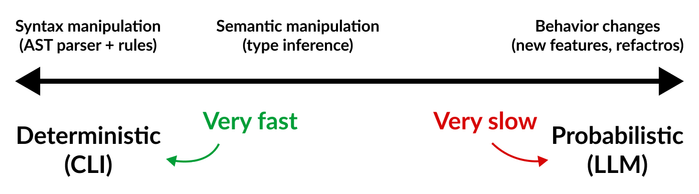
- Syntax manipulation — reshaping code without needing to know what the names mean. Changes in one file don’t depend on other files. Great fit for a deterministic CLI, and most of this migration lived here.
- Semantic manipulation — where correctness depends on type information the local source can’t see. Changes in one file depend on other files or packages. Doable with a CLI, but only if you take on type inference, so weigh it case by case against the effort of building a bespoke tool. The
AnimatedWidgetbug was exactly this: a fact the code’s shape could never reveal. - Behavior changes — new features, open-ended refactors. There’s no single “right” output here, so they need judgment, taste, and iteration. That’s where a human working with an LLM beats any CLI you could write.
“It compiles” isn’t “it’s correct.” Most of the actual engineering lived in that gap: producing code that not only parses, but still means what the original meant.
Your agent is only as good as the source of truth you give it. Examples got me a tool that worked on the cases I’d thought of. The specification got me one that handled cases I hadn’t. If there’s an authoritative source for what you’re building (a spec, an RFC, an API contract), give it to your agents directly instead of feeding them your paraphrase of it.
The Result — and How to Get It
So what did all this buy me? A Dart CLI that migrates ~100K lines of code in under a second, producing the exact same safe result on every run.
Compare that to where I started: the 700-line skill spent 200k+ tokens and 20+ minutes per migration on frontier models, and still produced different results across different models and even across runs of the same model. The CLI does in one second, every time, what the skill couldn’t do reliably in twenty minutes.
And because the agent now only orchestrates the pipeline and never rewrites your source, even a small, cheap model like Haiku can run the whole migration. The hard part is locked inside the deterministic tool, so you no longer need a frontier model to get a correct result.
Now, the honest tradeoff: it took me a week to build a narrow, single-purpose tool. Not everyone can justify that, and you shouldn’t always try. The agent-skill approach gets you something usable in an afternoon, and for a one-off migration on a small codebase, that may well be the right call. A deterministic CLI only pays off when the work is large, repeated, or has to be exact, which is precisely the case for a codebase-wide migration like this one.
The good news is you don’t have to spend that week yourself. I’ve open-sourced the tool in the ACT Dart Tools repository, so you can run a safe primary-constructors migration on your own codebase today.
Feel free to check it out, and as always, happy coding!