This video shows a complete spec-driven development workflow for building a real Flutter feature with AI: from a rough idea, to a refined spec, to an implementation plan, autonomous coding, QA, and final fixes.
Intro
The naive approach to agentic coding is simple: describe a feature in a prompt, send it to your coding agent, and let it write the code.
This can work for simple tasks, but it breaks down when the prompt is vague or under-specified. The agent has to fill in the gaps by making product and UX decisions on your behalf, and by the time you test the result, you may discover that it built something different from what you had in mind.
Spec-driven development solves this by shifting decision-making up front. Instead of asking the agent to implement a feature immediately, you first ask it to create a spec, ask clarifying questions, surface hidden requirements, and capture the intended behavior before any code changes are made.
The Agentic Coding Toolkit Workflow
The workflow shown in the video uses the Agentic Coding Toolkit, which is built around five main steps:
- spec: Turn a rough feature idea into a detailed product and technical specification.
- refine-spec: Review the spec adversarially against the existing codebase to find gaps, wrong assumptions, and implementation risks.
- plan: Convert the refined spec into a phased implementation plan.
- work: Let the agent implement the plan, optionally phase by phase, with tests and commits along the way.
- compound: Capture useful lessons and reusable patterns after the work is complete.
The toolkit is optimized for Flutter app development and includes Flutter-specific skills for testing, code quality, and maintainable implementation patterns.
The Real Flutter Feature
The demo uses a brownfield Flutter app called Folio Tracker, which already has portfolio, history, data entry, and investment management screens.
The feature request starts with a simple idea: the history page currently shows total portfolio value over time as a single line chart, but it would be useful to also see a stacked breakdown by investment type.
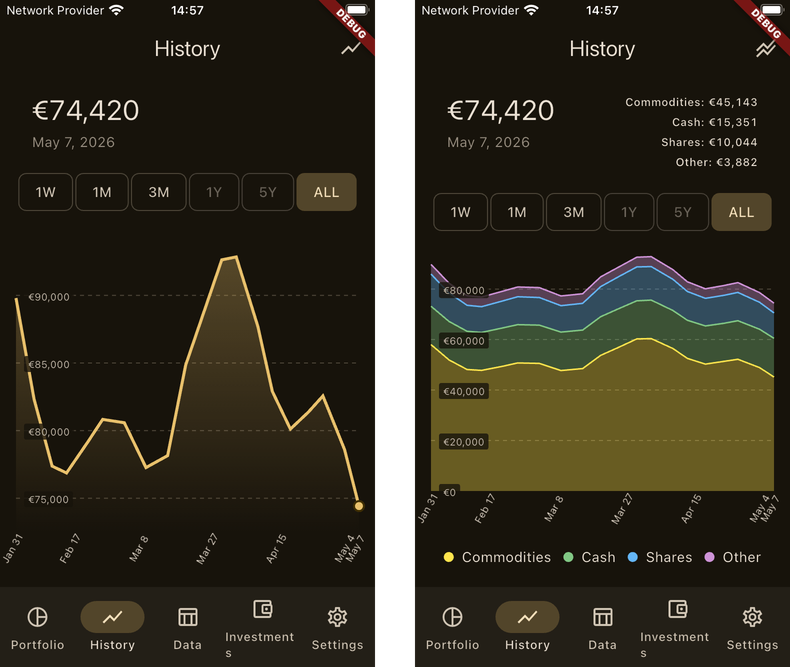
Even though this sounds straightforward, the task contains many hidden product decisions:
- Should the stacked chart replace the existing chart, or should there be a toggle?
- Should the chart be grouped only by investment type, or reuse all portfolio grouping modes?
- Should it be a stacked line chart or stacked area chart?
- What should happen when the user touches the chart?
- Should there be a legend, and where should it appear?
- What should the stacking order be?
- Should chart mode persist across app restarts?
These are exactly the kinds of decisions that an AI agent will otherwise make implicitly during implementation.
Creating the Spec
The first step is to write a short feature request to a file and pass it to the spec command.
Rather than asking questions blindly, the agent first researches the existing codebase. It inspects the current history chart, portfolio breakdown UI, data flow, existing conventions, and related implementation details.
Then it asks targeted clarifying questions. In the demo, these questions help decide that:
- The new chart should be grouped by investment type only.
- The desired style is a stacked area chart.
- The existing touch behavior should be preserved initially.
- The legend should appear below the chart.
- Types with zero value across the selected range should be hidden from the legend.
- The new chart should not replace the existing one; instead, an app bar toggle should switch between modes.
- The selected chart mode should persist across restarts.
After these decisions are made, the agent generates a full spec with goals, background, current behavior, constraints, user flows, requirements, edge cases, validation guidance, and a definition of done.
Refining the Spec
The next step is to run refine-spec in a fresh session using the generated spec file as input.
This command performs an adversarial review of the spec against the actual codebase. It checks whether the spec’s assumptions match the implementation, whether the charting package supports the desired behavior, and whether there are risks that need to be resolved before coding begins.
In the demo, the refine step produces findings ordered by severity and suggests concrete changes. One important decision concerns stacking order: the chart should sort investment types by decreasing value at the most recent snapshot, with the largest value at the bottom of the stack.
The refined spec becomes a stronger artifact because it captures both the intended product behavior and the realities of the existing codebase.
Planning and Implementation
Once the spec has been refined, the plan command turns it into a phased implementation plan.
The generated plan includes the feature context, implementation phases, test coverage, risks, and out-of-scope notes. Because most of the human decision-making already happened during the spec and refine-spec stages, the plan requires much less manual intervention.
Then the work command implements the plan. It can run all phases in one go, or stop after a single phase when more control is needed. In the demo, the full plan is implemented autonomously, with the agent making code changes and producing commits along the way.
Final QA
Even with a good spec and a refined plan, manual QA is still essential, especially for UI work.
After running the app, several issues become visible:
- The stacked areas are clipped because the Y-axis baseline starts above zero.
- The selection UI shows multiple dots, one for each stacked area boundary, instead of one dot at the top of the stack.
- The app bar toggle icon should represent the current mode more clearly.
- The legend chips should be simplified by removing their border styling.
These fixes are captured in a follow-up prompt, along with a screenshot, and the agent summarizes the requested changes before implementing them. After the fixes, the stacked chart renders correctly, starts at zero, preserves the vertical selection line, shows only one selected dot at the top of the stack, and displays a cleaner legend.
Summary
Spec-driven development is valuable because it surfaces hidden decisions before implementation begins.
A feature that starts as a short prompt can contain many important requirements around UX, data behavior, persistence, edge cases, and tests. The spec stage is the cheapest place to remove ambiguity because it gives you a single artifact to review before the agent changes code.
The refine-spec step makes this even stronger by challenging the spec against the real codebase and catching gaps early. By the time the workflow reaches planning and implementation, the process feels calmer because most of the important decisions have already been made.
However, specs are not a silver bullet. You still need to run the app, inspect the result, and do proper QA. This is especially true for UI work, where visual issues are often easier to spot at runtime than predict in advance.
The key takeaway is simple: don’t start with implementation. Start with a spec, use it to clarify ambiguity, keep yourself in charge of product decisions, and give your AI coding agent a much better target before it writes code.
Happy coding!