Did you know?
Rather than uploading your app store screenshots manually, you can automate the process with Fastlane!
Here’s how 👇
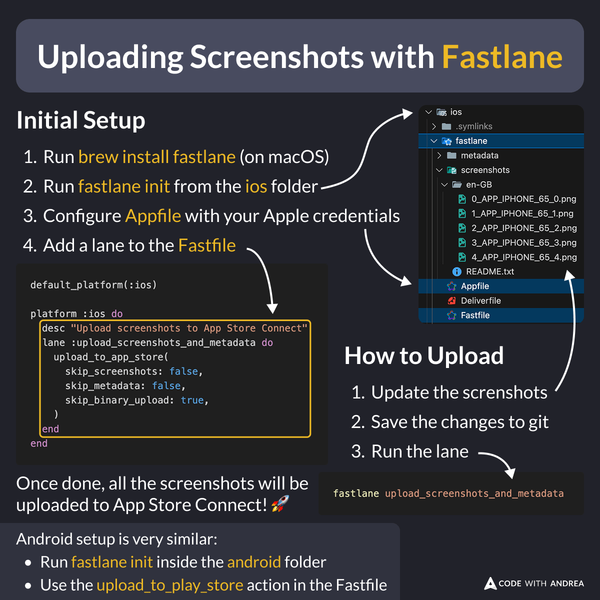
Before uploading to the App Store, fastlane will show a preview so you can check if everything looks good.
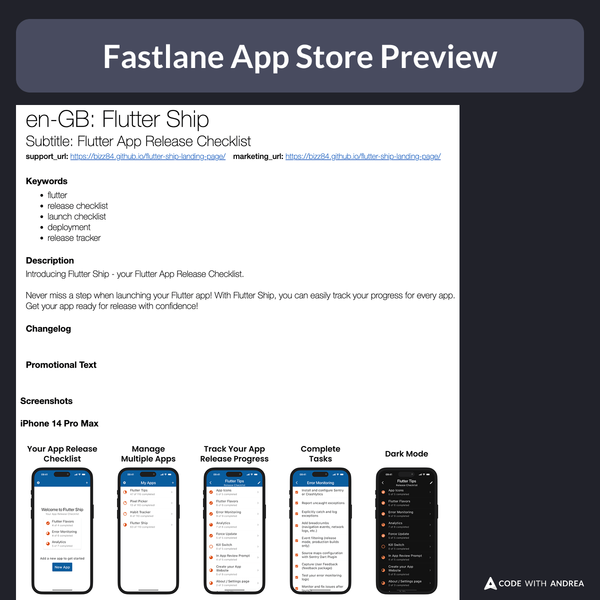
You can skip this by passing force: true to the upload_to_app_store lane (useful for non-interactive CI workflows).
Video Preview
Here’s a preview showing how to export screenshots from Figma and upload them with Fastlane, in less than one minute:
Flutter in Production
My latest course includes a whole module about screenshot automation, covering:
- ✅ Tips for better screenshots
- ✅ Capturing screenshots with Maestro
- ✅ Editing them with Figma
- ✅ Uploading them with Fastlane (locally & on CI)
Learn more here: