Did you know?
Flutter offers many ways to create custom layouts that can’t be expressed with Row and Column. 👍
For example, here’s how to overlay multiple widgets inside a Stack and constrain their size and position with Positioned and FractionallySizedBox. 👇
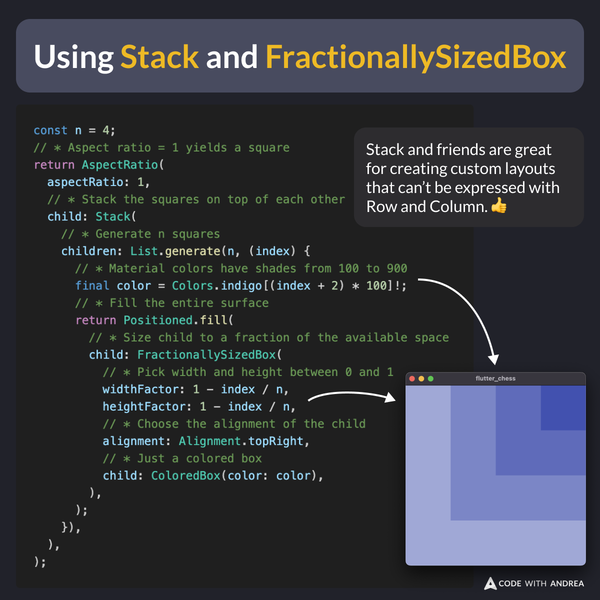
Example Code
const n = 4;
// * Aspect ratio = 1 yields a square
return AspectRatio(
  aspectRatio: 1,
  // * Stack the squares on top of each other
  child: Stack(
    // * Generate n squares
    children: List.generate(n, (index) {
      // * Material colors have shades from 100 to 900
      final color = Colors.indigo[(index + 2) * 100]!;
      // * Fill the entire surface
      return Positioned.fill(
        // * Size child to a fraction of the available space
        child: FractionallySizedBox(
          // * Pick width and height between 0 and 1
          widthFactor: 1 - index / n,
          heightFactor: 1 - index / n,
          // * Choose the alignment of the child
          alignment: Alignment.topRight,
          // * Just a colored box
          child: ColoredBox(color: color),
        ),
      );
    }),
  ),
);
Challenge
Bonus: Try to implement a chess board layout using Stack and FractionallySizedBox by completing this challenge:
Happy coding!