Did you know?
You can create a stylish Text by combining a ShaderMask with a LinearGradient! 🌈
Here’s how to do it. 👇
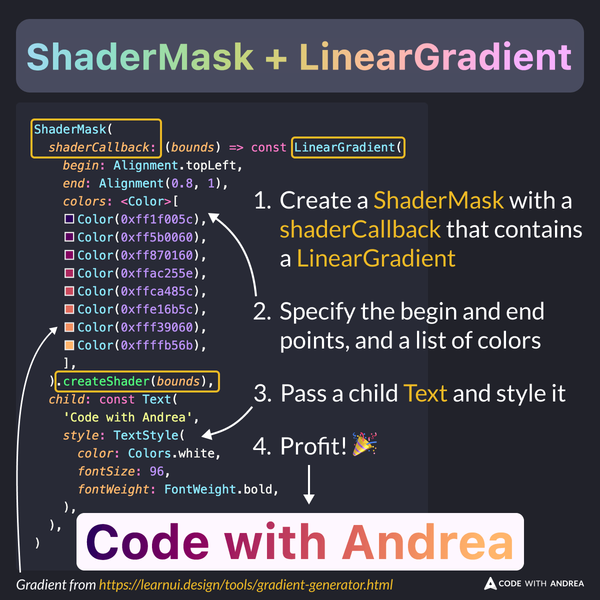
Example Code
ShaderMask(
  shaderCallback: (bounds) => const LinearGradient(
    begin: Alignment.topLeft,
    end: Alignment(0.8, 1),
    colors: <Color>[
      Color(0xff1f005c),
      Color(0xff5b0060),
      Color(0xff870160),
      Color(0xffac255e),
      Color(0xffca485c),
      Color(0xffe16b5c),
      Color(0xfff39060),
      Color(0xffffb56b),
    ],
  ).createShader(bounds),
  child: const Text(
    'Code with Andrea',
    style: TextStyle(
      color: Colors.white,
      fontSize: 96,
      fontWeight: FontWeight.bold,
    ),
  ),
)
You can use this tool to generate the gradient colors:
For more info:
- LinearGradient class
- LinearGradient (Widget of the Week)
- ShaderMask class
- ShaderMask (Flutter Widget of the Week)
Happy coding!