Did you know?
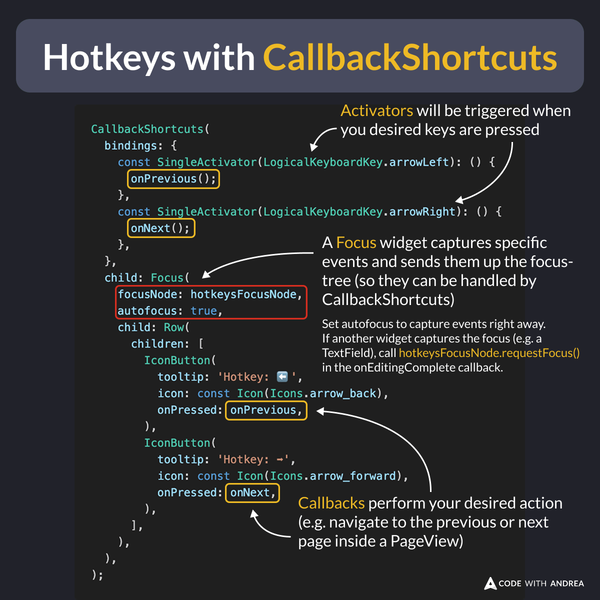
The CallbackShortcuts widget makes it easy to add keyboard shortcuts to your Flutter app.
To use it:
- Add one or more key bindings using
SingleActivator - Add a
Focuswidget to capture the desired events - Use callbacks to perform your desired actions
Example Code
// * If another widget captures the focus (e.g. a text field), call
// * hotkeysFocusNode.requestFocus() in the onEditingComplete callback.
static final hotkeysFocusNode = FocusNode();

// in the build method:
return CallbackShortcuts(
  bindings: {
    const SingleActivator(LogicalKeyboardKey.arrowLeft): () {
      onPrevious();
    },
    const SingleActivator(LogicalKeyboardKey.arrowRight): () {
      onNext();
    },
  },
  child: Focus(
    focusNode: hotkeysFocusNode,
    autofocus: true,
    descendantsAreFocusable: false,
    descendantsAreTraversable: false,
    child: Row(
      children: [
        IconButton(
          tooltip: 'Hotkey: ⬅️',
          icon: const Icon(Icons.arrow_back),
          onPressed: onPrevious,
        ),
        IconButton(
          tooltip: 'Hotkey: ➡️',
          icon: const Icon(Icons.arrow_forward),
          onPressed: onNext,
        ),
      ],
    ),
  ),
);
Note: the activators will only be triggered when there’s a focused child widget.
The easiest way to do this is to wrap your child widget in a Focus widget with autofocus: true.
If other widgets also rely on active focus, you can explicitly request focus with a FocusNode.
For more details about CallbackShortcuts, check this video:
To dive deeper and learn what to do when things don’t work as you expect, watch this three-part series. 👇
- Part 1: Focus (Widget of the Week)
- Part 2: Shortcuts (Widget of the Week)
- Part 3: Actions (Widget of the Week)
If you want to see this technique in action, check my Flutter Tips app (web version):
This supports three different keyboard shortcuts:
- Left arrow: go to the previous tip
- Space: favorite/unfavorite a tip
- Right arrow: go to the next tip
Happy coding!