Did you know?
If your Flutter app uses multiple flavors, you can use the FlutterFire CLI to generate the config files for each flavor.
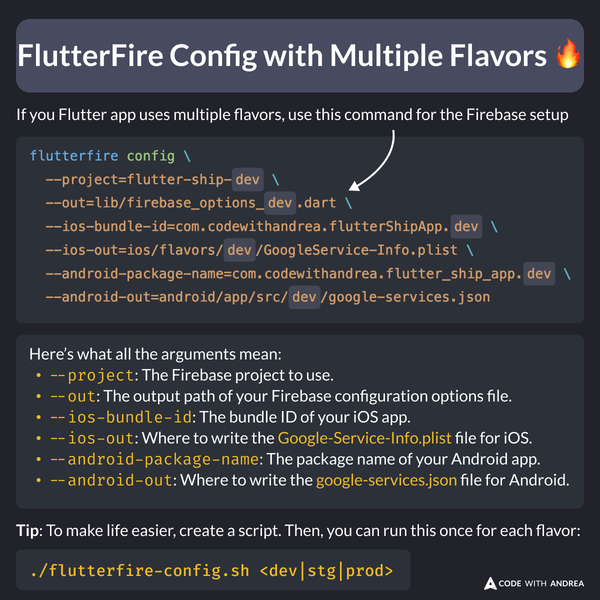
Here’s what each argument does:
--project: The Firebase project to use (note: pass the project ID, not the alias).--out: Output path for the Firebase config file.--ios-bundle-id: iOS app’s bundle ID. Find it in Xcode under Runner > General > Identity > Bundle Identifier.--ios-out: Output path for the iOSGoogleService-Info.plist.--android-package-name: Android app’s package name (found asapplicationIdinandroid/app/build.gradle).--android-out: Output path for the Androidgoogle-services.json.
Pro Tip: Create a Shell Script
To simplify the setup, here’s a sample shell script that takes the flavor as an argument:
To use this script:
- Copy it to the root of your project
- Update the
project,ios-bundle-id, andandroid-package-namefor your app. - Run it and follow the interactive prompts
This is only a small part of the Flutter app flavoring process.
For all the details, check my latest course. 👇