Did you know?
If you have a Flutter project that no longer builds on a specific platform, you can try this:
- delete the whole folder
- use the Flutter CLI to generate it again
- discard any unwanted changes
When it works, this can save you hours of frustration. 😌
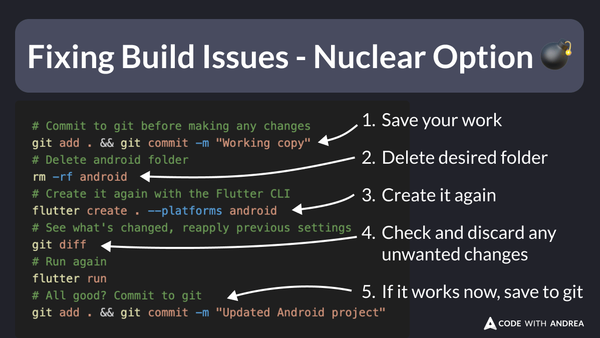
Here are the steps:
# Commit to git before making any changes
git add . && git commit -m "Working copy"
# Delete android folder
rm -rf android
# Create it again with the Flutter CLI
flutter create . --platforms android
# See what's changed, reapply previous settings
git diff
# Run again
flutter run
# All good? Commit to git
git add . && git commit -m "Updated Android project"
To learn more about effective techniques for shipping your apps in production, check out my latest course: