Dark and Tinted Icons on iOS 18

Did you know?

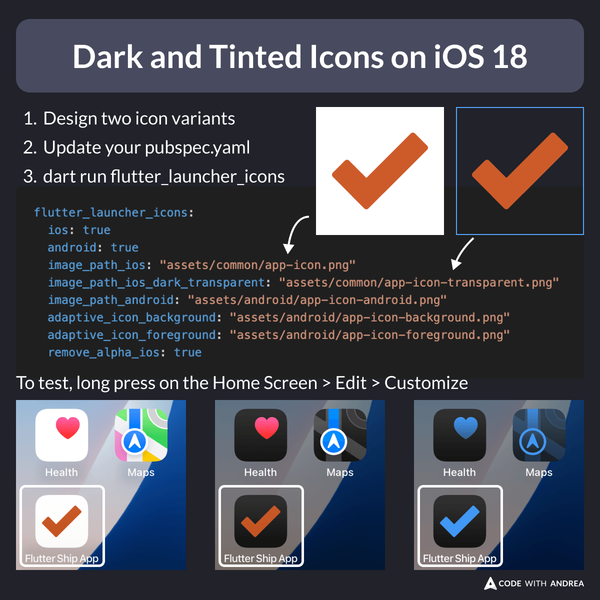
iOS 18 supports dark and tinted icons.

To enable this in your Flutter app:

  • Add one icon variant with transparency
  • Install and configure flutter_launcher_icons in your pubspec.yaml
  • Run dart run flutter_launcher_icons

Then, run the app and join the dark side! ๐ŸŒš

Dark and Tinted Icons on iOS 18

Following all the app icon guidelines on iOS and Android can be tricky.

To make life easier, my new course includes a whole module about launcher icons and splash screens.

If youโ€™re interested, check it out here:

Want More?

Invest in yourself with my high-quality Flutter courses.

Flutter Foundations Course

Flutter Foundations Course

Learn about State Management, App Architecture, Navigation, Testing, and much more by building a Flutter eCommerce app on iOS, Android, and web.

Flutter & Firebase Masterclass

Flutter & Firebase Masterclass

Learn about Firebase Auth, Cloud Firestore, Cloud Functions, Stripe payments, and much more by building a full-stack eCommerce app with Flutter & Firebase.

The Complete Dart Developer Guide

The Complete Dart Developer Guide

Learn Dart Programming in depth. Includes: basic to advanced topics, exercises, and projects. Last updated to Dart 2.15.

Flutter Animations Masterclass

Flutter Animations Masterclass

Master Flutter animations and build a completely custom habit tracking application.