Ever wanted to track page views or add navigation breadcrumbs to your error logs?
This can be done by implementing a NavigatorObserver. ✅
Here’s some sample code showing how to implement this. 👇
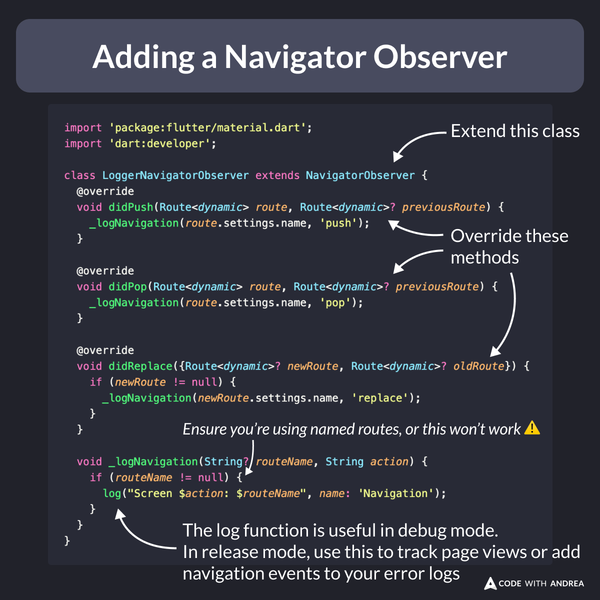
import 'package:flutter/material.dart';
import 'dart:developer';

class LoggerNavigatorObserver extends NavigatorObserver {
  @override
  void didPush(Route<dynamic> route, Route<dynamic>? previousRoute) {
    _logNavigation(route.settings.name, 'push');
  }

  @override
  void didPop(Route<dynamic> route, Route<dynamic>? previousRoute) {
    _logNavigation(route.settings.name, 'pop');
  }

  @override
  void didReplace({Route<dynamic>? newRoute, Route<dynamic>? oldRoute}) {
    if (newRoute != null) {
      _logNavigation(newRoute.settings.name, 'replace');
    }
  }

  void _logNavigation(String? routeName, String action) {
    if (routeName != null) {
      log("Screen $action: $routeName", name: 'Navigation');
    }
  }
}
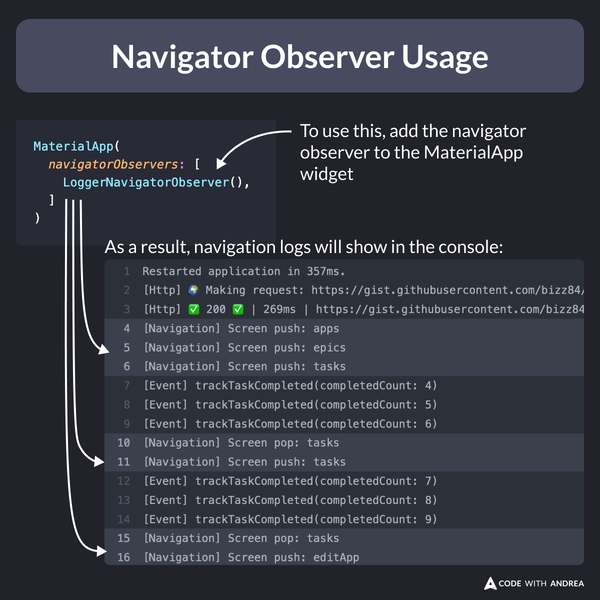
To use the navigator observer, simply add it to the MaterialApp widget.
As a result, navigation logs will show in the console.
A couple of extra tips:
- some packages already offer a navigator observer (e.g.
SentryNavigatorObserver), so you may not need to implement your own - whatever you do, DON’T track page views on the
buildmethod (this can be called many times when widgets rebuild, and is out of your control)
I will cover analytics and error monitoring in detail in my upcoming course.
If you want to ship your apps with confidence, check it out and join the waitlist. 👇