For the last few years, Google I/O has been heavily focused on AI, and this year was no exception.
But if you’re reading this newsletter, you’ll probably want to know all about the latest Flutter 3.44 and Dart 3.12 releases. This is quite an exciting release, so let’s dive in!
Flutter 3.44
Flutter 3.44 is a big release that brings some major improvements to the platform:
- Swift Package Manager as the new iOS/macOS default
- Improved Vulkan support for Impeller
- Hybrid Composition++ for Android
- Improved Widget Previews
- Dart & Flutter Agent Skills
These are just the highlights. You can read the full scoop in the official blog post:
A video overview from Google I/O is also available here: What’s new in Flutter.
🧱 Swift Package Manager support
Swift Package Manager support deserves a special mention, since it’s an official replacement for CocoaPods (and all the issues that come with it 😬).
Indeed, the team shared a dedicated blog post about it:
After taking SPM for a ride, I can report that it works great on small projects. But on more complex ones, I’ve hit an issue where the iOS app no longer builds (and all the supposedly-smart AI agents were unable to fix it).
Luckily, there’s an escape hatch. If the migration fails, simply disable SPM support in your pubspec.yaml file:
flutter:
  config:
    enable-swift-package-manager: false
Hopefully, any outstanding issues will be resolved soon and we’ll finally be able to migrate our apps to SPM!
Dart 3.12
Dart 3.12 brings some new features that make app development much easier:
- Private named parameters
- Experimental primary constructors
- Cloud Functions for Firebase and experimental Dart support
- Genkit Dart preview
- Agentic Hot Reload
You can read all the details in the official blog post, which is now published on the new Dart Blog (bye bye Medium! 👋).
The new features are quite significant, so let me cover them one by one. 👇
⌨️ Private Named Parameters
This is a very nice quality-of-life improvement that allows you to list private parameters in constructors like this:
class Hummingbird {
  final String _petName;
  final int _wingbeatsPerSecond;

  // OK with "Private Named Parameters"! :D
  Hummingbird({required this._petName, required this._wingbeatsPerSecond});
}
Then, you can invoke the constructor with the corresponding public names:
print(Hummingbird(petName: 'Dash', wingbeatsPerSecond: 75));🧪 Experimental Primary Constructors
This has been one of the most requested features in the Dart language funnel.
Primary constructors allow you to declare constructor parameters directly in the class header:
class Point(final int x, final int y);As of Dart 3.12, they are still experimental. To enable them, set sdk: ^3.12.0 in your pubspec.yaml file and add these lines to your analysis_options.yaml file:
analyzer:
  enable-experiment:
    - primary-constructors
🔥 Cloud Functions for Firebase and experimental Dart support
For many years, I’ve been writing my Flutter apps in Dart (obviously) and my Firebase Cloud Functions in TypeScript.
But now that the Firebase team has announced Dart support in Cloud Functions, we get some big benefits:
- We can use Dart on the client and on the server.
- Cold starts become much faster (Dart Cloud Functions are compiled Ahead-of-Time).
- Hot reload on the emulators 🎉
That’s great news, and I can’t wait to try this out in my own apps.
For more details, read:
🤖 GenKit Dart Preview
Genkit Dart is an open-source framework for building full-stack, AI-powered apps with Dart and Flutter.
It ships with type-safe, model-agnostic APIs for Google, Anthropic, and OpenAI models, meaning you no longer have to roll out your own REST API wrappers for each project.
Instead, you can simply write:
import 'package:genkit/genkit.dart';
import 'package:genkit_google_genai/genkit_google_genai.dart';
import 'package:genkit_anthropic/genkit_anthropic.dart';

void main() async {
  final ai = Genkit(plugins: [anthropic()]);

  // Call a Claude model from Anthropic.
  final claudeResponse = await ai.generate(
    model: anthropic.model('claude-opus-4.6'),
    prompt: 'Hello from Claude',
  );
}
Less boilerplate, more type safety. What’s not to like?
More info here:
A video overview is also available here: Introducing Genkit Dart.
⚡️ Agentic Hot Reload
In the past, when a coding agent made changes to your code, you needed to manually trigger a hot reload to see the result, and this made it harder for agents to verify their changes on the running app.
With this latest update, agents using the Dart MCP server can now automatically hot reload, thus reducing friction and streamlining your workflows.
If you want to test this, make sure you’ve installed and enabled the Dart MCP Server in your coding agent.
Flutter videos from Google I/O 2026
While Google I/O was all about stuffing Gemini models into every Google product and service, a dedicated Flutter playlist was published on YouTube:
In particular, I’d like to call out this video about How to write really good Flutter code, which covers tips for:
- Building responsive UIs
- Using the Dart MCP server to debug and fix layout errors
- Building reusable widgets and leveraging the Widget preview tool
- Adopting a layered architecture and the repository pattern for better separation of concerns
- Using the MCP server to discover packages on pub.dev, get the latest APIs, and integrate them into your app
- Writing unit, widget, and integration tests
While these techniques have been around for a while, the video shows how the latest tools and the official agent skills can help you get some new productivity gains in your daily work.
Latest AI news
No month goes by without some new model being released. This time around, we got Gemini 3.5 Flash from Google, and Claude Opus 4.8 from Anthropic, each touting impressive scores in the usual benchmarks.
But are these “trust-me-bro” benchmarks really reliable? And are these models really as good as they claim, especially when it comes to coding?
While surfing the web, I discovered a new AI coding benchmark called Program Bench, which sets out to answer this question:
🧱 Can language models rebuild programs from scratch?
The caveat is that the rules are very strict:
In each task, the agent receives an executable and its documentation, and it must re-implement the given executable. It does not get access to any of the executable’s source code, it cannot de-compile the executable, and cannot use the internet.
As of today, the results are humbling:
- Most frontier models score ZERO percent
- Only GPT-5.5 high and xhigh manage to score 0.5%
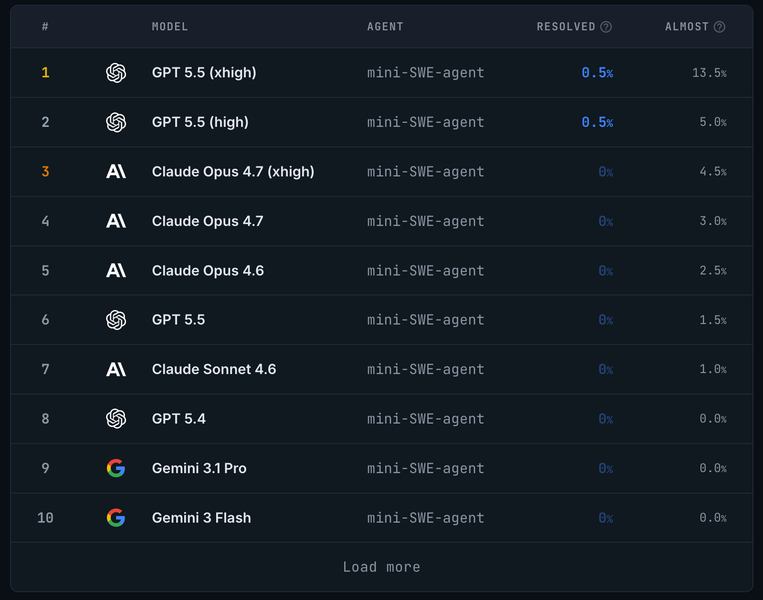
This tells me that as soon as LLMs can’t cheat by copying the source code from the internet, they’re dead in the water.
If you’re thinking: “hang on, what about that story where a team of parallel Claudes built a C compiler?” As it turns out, the end result wasn’t that good, after all.
AI Videos
Recently, I’ve come across AI Engineer, a YouTube channel that shares talks, workshops, events, and training for AI engineers. All the speakers are experts in their field, and here I wanted to share a video that I found particularly interesting.
📹 Building pi in a World of Slop — Mario Zechner
Pi is a minimal and highly customisable terminal coding agent.
It was created by Mario Zechner, who’s been described as the “most sane person on the internet talking about AI right now”.
In this video, he talks about his frustration with existing agent harnesses, some of the drawbacks of existing tools, and his philosophy when building pi:
I really liked how he kept it real about the current state of things, where “our product has been 100% built by agents” leads to “it fu**ing sucks now” and “everything is broken”. 🤣
Latest from Code with Andrea
Over the last month, I kept working on my Agentic Coding Toolkit, by adding Cursor and Codex support and new skills (including Figma to Flutter support).
As promised, I also started making YouTube videos again. Here are the latest ones: 👇
📹 Spec-Driven Development with AI: Building a Real Flutter Feature Step by Step
Spec-driven development is a very well established software development practice. It involves writing detailed specifications for a feature before starting to code, and then using those specifications to guide the development process.
This makes it a good fit for many AI-coding workflows, since you can describe what you want, then have the AI ask clarifying questions and help you iterate until all user flows and edge cases are covered. And once the spec is ready, you can hand off to AI for the actual implementation.
But how does this work in practice on existing, real-world brownfield codebases? And are there scenarios where it’s not a good fit? This video covers all the details:
📹 Should you use /init to generate CLAUDE.md or AGENTS.md?
When coding with AI, you have probably come across the built-in /init command.
When you run /init, the agent explores your codebase and generates a useful-looking AGENTS.md/CLAUDE.md file that summarises the commands, architecture, and conventions in your project.
But here’s the catch: AGENTS.md and CLAUDE.md are special memory files that get loaded at the start of every session, using up tokens in your context window.
So it’s very important that this file remains extremely small, and only contains information that is highly relevant in every single session.
Ironically, that’s the exact opposite of what the /init command generates. So in my latest video, I decided to audit an init-generated file from a real Flutter project and tear it down line-by-line:
📹 Bonus: Flutter Community Updates + Agentic Coding Toolkit w/ Andrea
The nice folks at the Flutter Community invited me to join them for a live stream, where we talked about the recent evolution of agentic coding workflows, the importance of creating reusable skills, and other practical tips for getting more out of your AI coding tools.
If you’re interested, here’s the recording:
Until Next Time
I was very happy to hear about the latest language features in Dart 3.12! I look forward to bringing them to my apps, and why not, maybe I can even create and share some new skills to make the migration easier.
Alongside that, I’ll keep working on my Agentic Coding Toolkit and continue refining it for Flutter app development workflows.
Thanks for reading, and happy coding!